Topics and disclosures
Navigating the standard, marking what is material, and reading the progress indicators.
Topics
A topic is a top-level area of the standard. The topic page lists its disclosures as cards and carries the topic's own responsible user and, where the standard provides one, a link to the official text on EUR-Lex.
Disclosure cards
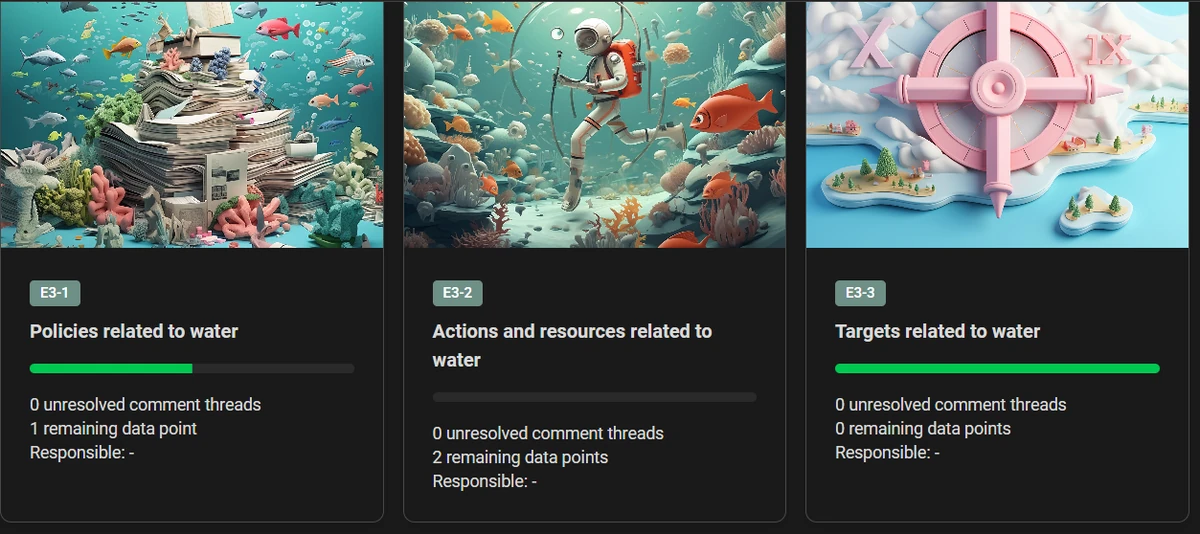
Each card shows the disclosure id, its name, a progress bar, the number of unresolved comment threads, the number of remaining data points and the responsible user. A disclosure that has been marked not material shows Not material instead of progress.
Marking a disclosure material
Open a disclosure and use the Material toggle in the overview panel at the top.
Marking a disclosure as not material records that your organisation concluded it does not apply. The page is dimmed, its data points stop counting towards progress, and the disclosure is left out of published reports and PDFs.
The toggle is disabled when the disclosure is mandatory under the standard, when the report is not active, or when you only have read access.
Inside a disclosure
The disclosure page has an overview panel followed by the data points, grouped under the headings the standard uses. Groups are collapsible and open by default.
The overview panel holds:
- the responsible user for this disclosure,
- the Material toggle,
- any description fields the standard defines for the disclosure,
- a general free-text field, which is the disclosure's summary, described below.
Below the data points, the page also shows the standard's Application Requirements, Consideration and Guidance text where they exist, so you do not have to look the wording up elsewhere.
The summary
The data points in a disclosure are answers to separate questions: a figure, a date, a yes or a no. Each one is exact, and read end to end they are still a list of fields. The summary is where the same disclosure is told as prose: what the numbers add up to, what changed since last year, and what the company is doing about it.
That matters when the report leaves the application. A published report shows the summary along with the disclosure's reported data, so an investor, a customer or a job applicant reads something continuous rather than working through a table of answered fields. The figures are still there, underneath, for anyone who wants them.
Write it once the disclosure's data points are answered, so there is something to summarise. If you would rather start from a draft, Generate Summary writes one from the answers already in the disclosure and you edit from there. See Disclosure summaries.
Hidden data points
A data point that has been switched off in its settings is removed from the report, including exports and publications. When a disclosure contains any, a Show inactive data points toggle appears and shows them dimmed, so it is visible that something was deliberately excluded rather than missed.

